
Character limits appear in social posts, form fields, advertisements, metadata, academic submissions, and code. An exact count helps you edit deliberately instead of discovering that the final sentence has been truncated.
The main difficulty is that different platforms count text differently. Some count spaces and line breaks, while others apply special rules to links, emoji, or combined Unicode characters. This guide explains the practical rules and shows how to verify a draft before publishing it.
What counts as a character?
In everyday writing, a character is any visible letter, number, punctuation mark, symbol, or space. Most basic counters measure the length of the text as represented by the browser. That makes the result predictable for ordinary English text and most common writing tasks.
Line breaks and tabs count as whitespace characters. If a form has a strict technical limit, check whether its documentation includes whitespace in the total.
- Letters and numbers count individually.
- Spaces and punctuation usually count.
- A line break normally contributes to the total.
- Emoji can contain multiple Unicode code points even when they look like one symbol.
Characters with spaces vs without spaces
Both measurements are useful. The count with spaces tells you the actual length accepted by most form fields. The count without spaces gives a rough view of the amount of written content and is sometimes requested for translation or editorial work.
For example, the sentence 'Tools are ready' contains 15 characters when both spaces are included and 13 when spaces are excluded. Punctuation would add to both totals.
Count the final version
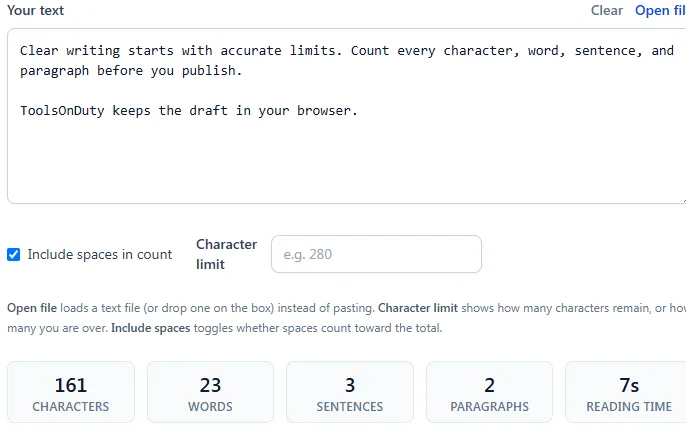
Paste the final version of your text into the character counter, not an earlier draft. Review the total with spaces first, then inspect words, sentences, and lines for context. If the text is over its limit, remove repetition before shortening important names, dates, or calls to action.
- Remove accidental spaces and blank lines.
- Replace wordy phrases with direct alternatives.
- Keep essential facts and the main action clear.
- Recheck after every edit instead of estimating the reduction.
When manual counting goes wrong
Manual counting becomes unreliable once text includes punctuation, repeated spaces, or multiple paragraphs. Word processors can also report a different metric from the one a platform enforces. Check the exact text you plan to submit, including its final spacing and line breaks.
For sensitive text, use a tool that processes content locally in the browser. The ToolsOnDuty character counter does not require an upload or account, so the draft stays on your device.
Try the related tools
Apply the steps from this guide directly in your browser.
Frequently asked questions
Do spaces count as characters?
Usually yes. Most form and platform limits include spaces, punctuation, and line breaks, but you should check the rules of the specific service.
Why can an emoji count as more than one character?
Some emoji are built from several Unicode code points, such as a base symbol, skin tone modifier, or joining character. Visual symbols and technical string length are not always identical.
Can I count characters without spaces?
Yes. A good character counter reports both totals so you can use the measurement required by your writing task.