
A strong password is long, unpredictable, and used for only one account. Complexity rules can help, but adding a symbol to a familiar name does not make that pattern truly random. Attackers test common substitutions, dates, keyboard paths, and leaked passwords automatically.
The practical solution is not to memorize dozens of complicated strings. Generate unique credentials, save them in a reputable password manager, and protect the most important accounts with multi-factor authentication.
Prioritize length and unpredictability
Every additional random character expands the number of possible passwords. A long generated password is generally stronger than a short password that merely satisfies uppercase, number, and symbol requirements.
For a password you must type manually, a multi-word passphrase can be easier to enter. The words still need to be selected randomly. A famous quotation or personal sentence is predictable even when it is long.
- Use the maximum practical length accepted by the service.
- Avoid names, birthdays, addresses, and repeated patterns.
- Never reuse a password across different accounts.
- Do not share passwords through ordinary email or chat.
Generate instead of inventing
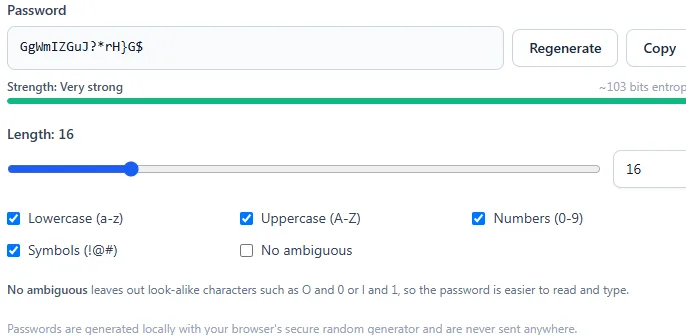
Humans tend to create patterns even when trying to be random. A cryptographically secure generator selects characters without those habits. Choose a length that the destination supports and include the permitted character groups.
Store and recover credentials safely
A password manager can generate, encrypt, and autofill unique credentials. Protect its master password carefully and keep recovery information current. Store backup codes for multi-factor authentication somewhere separate from the device used to sign in.
Change a password promptly if the service reports a breach, you entered it on a suspicious page, or another person learned it. Routine changes without evidence of compromise can encourage weaker patterns and are less useful than uniqueness and multi-factor authentication.
Treat strength scores as estimates
A checker estimates resistance from length, character variety, and recognizable patterns. It cannot know every breach database or the security of the website storing the password. A high score does not compensate for reuse or phishing.
Try the related tools
Apply the steps from this guide directly in your browser.
Frequently asked questions
How long should a password be?
Use at least 14 to 16 characters when the service allows it, and prefer longer generated passwords for accounts you store in a password manager.
Is a passphrase better than a password?
A randomly generated multi-word passphrase can be strong and easier to type. Predictable quotations and personal phrases are not equivalent to random words.
Should every account have a different password?
Yes. Unique passwords prevent one breached service from exposing your other accounts through credential stuffing.