
A JSON Web Token commonly contains three dot-separated segments: header, payload, and signature. The first two segments use Base64url encoding, which makes their JSON readable without any secret key.
Decoding answers what the token claims. Verification checks whether a trusted issuer signed the token and whether its protected content is unchanged. An application must not grant access based only on decoded values.
Understand the three segments
The header identifies the token type and signing algorithm. The payload contains claims such as issuer, subject, audience, expiration, and application-specific data. The signature binds the encoded header and payload to a key.
JWT payloads are not encrypted by default. Do not place passwords, private keys, or information that should be hidden from the token holder in an ordinary signed JWT.
base64url(header).base64url(payload).signatureDecode for inspection
Decoding is useful for debugging claim names, timestamps, and token shape. It does not prove who created the token. Anyone can construct a header and payload that claim administrator access.
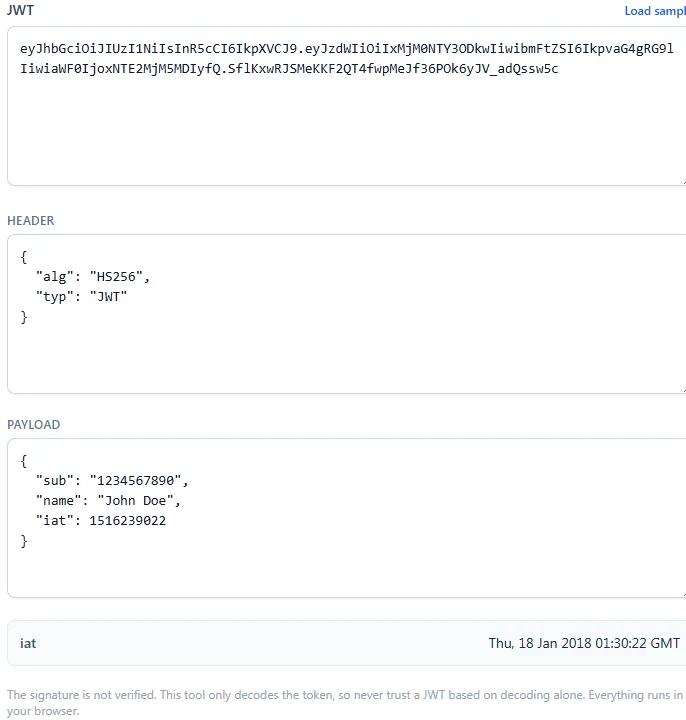
Verify the signature and claims
Verification must use the expected algorithm and the correct trusted key. After cryptographic verification, the application still needs to validate claims such as expiration, not-before time, issuer, and audience.
Do not accept the algorithm solely because the untrusted header requested it. Server libraries should be configured with an explicit allowlist and appropriate key type.
- Verify the signature with a trusted secret or public key.
- Require the expected issuer and audience.
- Reject expired tokens and respect not-before times.
- Keep signing keys out of browser code and public repositories.
Handle tokens carefully
Bearer tokens can grant access to whoever possesses them. Avoid pasting production tokens into remote debugging services, exposing them in screenshots, or placing them in URLs. Redact tokens from logs and use short lifetimes with a deliberate renewal strategy.
ToolsOnDuty decoding and supported HMAC verification run in the browser, but real application authorization belongs on a trusted server that controls keys and policy.
Try the related tools
Apply the steps from this guide directly in your browser.
Frequently asked questions
Can I read a JWT without the secret key?
You can decode the usual signed JWT header and payload because they are encoded, not encrypted. You cannot establish authenticity without verification.
Does a valid signature mean the token should be accepted?
Not by itself. The application must also validate issuer, audience, time claims, algorithm policy, and any required authorization claims.
Should a JWT contain sensitive information?
Not in a normal signed JWT payload. The holder can read it. Store only claims appropriate for client visibility and protect the token itself.