
Meeting Agenda Maker
Design a branded, timed meeting agenda with premium themes, logo, cover image, movable agenda rows, preparation, decisions and action records.
About the Meeting Agenda Maker
Meeting Agenda Maker is a premium document studio for planning focused meetings and producing a client-ready or internal branded agenda. Choose one of five themes, upload an organization logo or header image and customize document colors and typography.
Agenda topics are real editable rows rather than pipe-delimited text. Add, remove and reorder topics, assign an owner and duration, and monitor the calculated meeting length in real time.
The A4 document combines meeting objective, attendees, preparation, timed agenda, decisions, action items, notes and facilitator information. Export a high-resolution PNG, multi-page PDF or editable JSON backup. Images and drafts remain in the browser.
Key features
- Modern, Executive, Minimal, Creative and Midnight themes
- Organization logo and header-image uploads
- Custom colors, typography, business details and footer
- Dynamic add, remove and reorder agenda rows
- Timed topics, owners and automatic duration total
- Objective, attendees, preparation, decisions, actions and notes
- A4 live preview with PNG, PDF, print and JSON exports
- Local autosave without an account or watermark
How to use
- 1Select a premium theme and add approved organization branding.
- 2Enter the meeting date, time, location, facilitator and outcome-focused objective.
- 3Add, remove or reorder agenda rows, then assign an owner and minutes to each topic.
- 4Complete attendees, preparation, decisions, actions and notes sections.
- 5Review the live A4 document and export PDF, PNG, print or editable JSON.
Examples
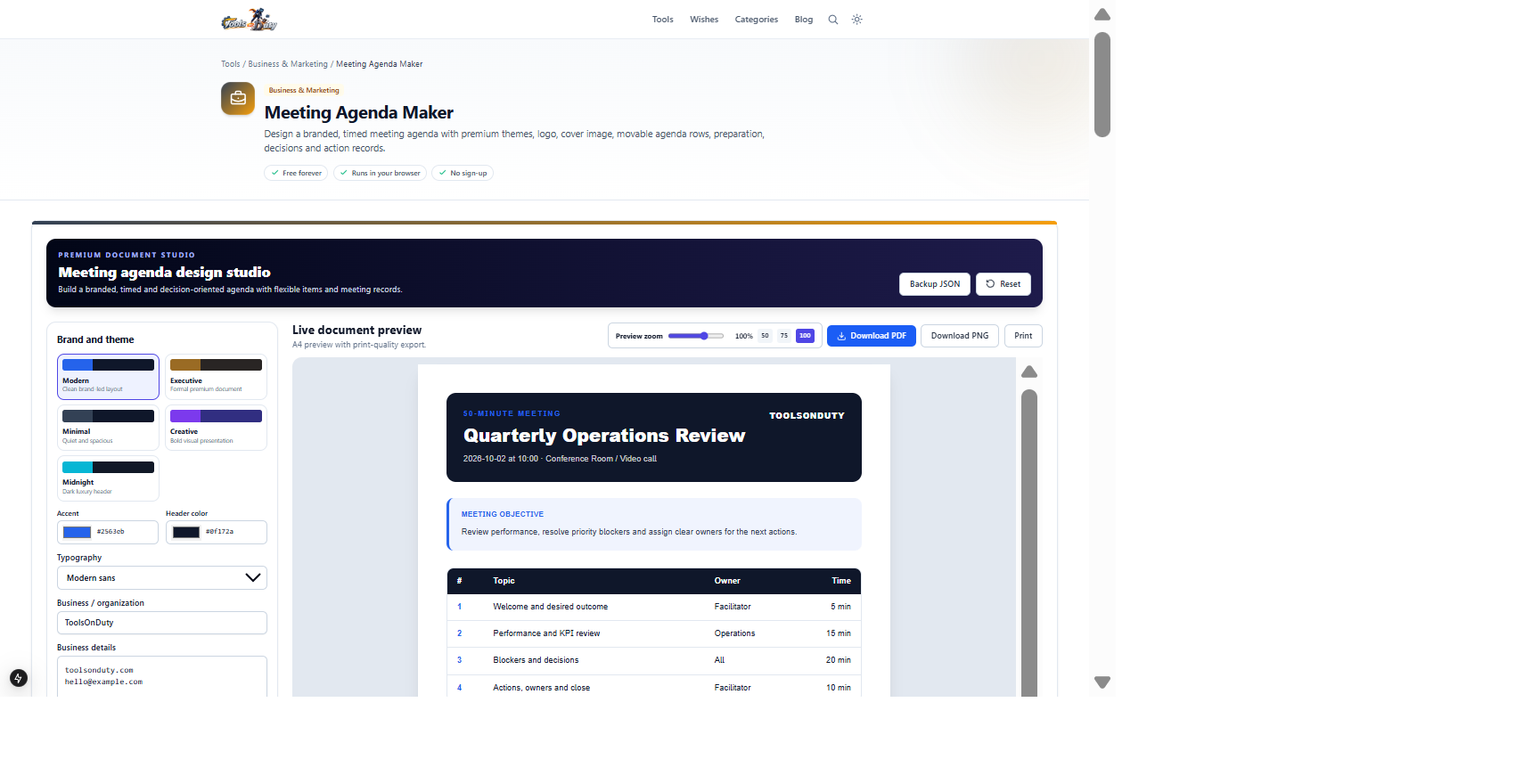
Four owned agenda topics, a 50-minute schedule, preparation, decisions and actionsA branded A4 agenda and meeting recordThe studio opens with this complete example. Edit a topic, owner or duration to see the document and total meeting time update.
Frequently asked questions
- How do I add agenda topics?
- Use Add agenda item. Every row has separate topic, owner and minutes fields plus move-up, move-down and remove controls.
- Does it calculate meeting length?
- Yes. The studio totals the minutes across all agenda rows and displays the duration in the editor and document heading.
- Can I add company branding?
- Yes. Choose a theme, customize accent and header colors, upload a logo or cover image, and edit organization details and footer.
- Can I use it for meeting minutes?
- Yes. Separate decisions, action items and notes sections are included in the exported document.
- Are logos and meeting details uploaded?
- No. Draft storage, image handling and document generation run locally in your browser.
- Which exports are available?
- Download PDF, high-resolution PNG, print through the browser or save an editable JSON backup.
Continue your workflow
Open a related tool to prepare your files or refine the finished result.
- Date & Time CalculatorsMeeting Time Finder
Find good meeting times across multiple time zones with a working-hours overlap grid.
Open tool - Productivity & TimeMeeting Cost Calculator
Estimate salary time spent on one meeting and its recurring annual cost.
Open tool - Featured toolBusiness & MarketingBusiness Proposal Builder
Create a premium branded proposal with themes, logo, cover image, persuasive narrative, flexible deliverables, milestones, itemized investment and approval.
Open tool