
Professional Card Builder
Design premium front-and-back professional, employee, staff, membership and contact cards with templates, drag-and-drop editing, custom backgrounds, QR codes and print-ready exports.
About the Professional Card Builder
Professional Card Builder is a complete browser-based design studio for creating coordinated front-and-back professional cards. It is suitable for company staff cards, employee identity cards, membership cards, event credentials, educator cards, freelancer contact cards and other non-government professional uses.
Start with Corporate, Executive, Minimal, Creative, Technology or Midnight. Each premium preset provides a considered color system, typography, spacing, photo treatment and front/back composition. You can retain that professional arrangement or change the colors, pattern, font, alignment, corners and visible information.
Premium Layout mode protects the preset composition so you can quickly create a balanced result. Customizable Layout mode unlocks individual front and back elements. Select an element in the editor or directly on the card, drag it to a new position, resize it, rotate it, change its alignment and typography, adjust its layer, lock it or hide it.
Add a profile photo and company logo from your device. You can also override either side with an independent background image while retaining the selected template's text design. Separate front and back controls provide fit, overlay, zoom, horizontal and vertical stretch, and precise X/Y positioning.
The card uses the standard 1.585:1 ID-card proportion in landscape and its corresponding portrait ratio. The editor recommends 1585 by 1000 pixels for landscape backgrounds and 1000 by 1585 pixels for portrait backgrounds, with at least 1200 pixels on the longest side for sharper output.
All design work happens locally in your browser. The tool does not upload your photos, logos, backgrounds or card information to ToolsOnDuty. Your current draft is saved locally, and an editable JSON backup can be downloaded for safekeeping.
Export the front or back as a high-resolution PNG, create a two-page front-and-back PDF at standard card proportions, or use browser printing. Preview zoom is independent of export, so changing the on-screen preview size does not reduce the output dimensions.
This tool is intended for legitimate professional, organizational, membership and contact-card design. It is not a government ID, passport, driving licence or official credential generator, and its output must not be misrepresented as one.
Key features
- Six editable premium templates: Corporate, Executive, Minimal, Creative, Technology and Midnight
- Landscape and portrait standard ID-card proportions
- Coordinated live front and back previews
- Premium Layout mode with protected professional positioning
- Customizable Layout mode with direct drag-and-drop editing
- Independent controls for every available front and back element
- Per-element position, width, font size, rotation and opacity
- Per-element alignment, font weight and text-color override
- Bring forward, send backward, visibility and position-lock controls
- Reset one element or restore the complete custom layout
- Private profile-photo and company-logo uploads
- Independent front and back background-image overrides
- Cover and contain background fitting
- Background zoom plus horizontal and vertical stretch or squeeze
- Independent background X/Y position and readability overlay
- Displayed background ratio and recommended pixel dimensions
- Editable business identity, contact and back-side information
- Locally generated QR code with custom content
- Editable colors, typography, patterns, alignment, corners and photo shapes
- Responsive preview with 50 to 125 percent preview-only zoom
- High-resolution front and back PNG downloads
- Two-page print-ready front-and-back PDF
- Browser printing, local autosave and editable JSON backup
- No watermark, account requirement or paid export lock
How to use
- 1Choose Corporate, Executive, Minimal, Creative, Technology or Midnight as the starting design.
- 2Select landscape or portrait orientation and review the displayed card ratio and recommended background dimensions.
- 3Use Premium Layout for a protected professional composition or switch to Customizable Layout for complete element positioning.
- 4Enter only the name, role, organization, department, ID and contact details you are authorized and comfortable displaying.
- 5Upload an optional profile photo and company logo. Use PNG for transparent logos and a clear JPEG or WebP for photographs.
- 6If desired, upload separate front and back backgrounds. Adjust fit, overlay, zoom, stretch and position for each side independently.
- 7Customize brand colors, font family, background pattern, text alignment, corner radius and photo shape.
- 8In Customizable Layout, select or click an element, drag it on the preview, then refine its size, rotation, typography, layer, visibility or lock state.
- 9Add the back-side description, return information and QR content. Test the QR code from another device before printing.
- 10Use preview zoom to inspect the design without affecting the exported dimensions.
- 11Download front and back PNG files for digital use, or export the two-page PDF for printing.
- 12Print one test card, check margins, legibility, colors, QR scanning and trimming before producing multiple copies.
- 13Download the JSON backup if you may need to edit the same design later.
Examples
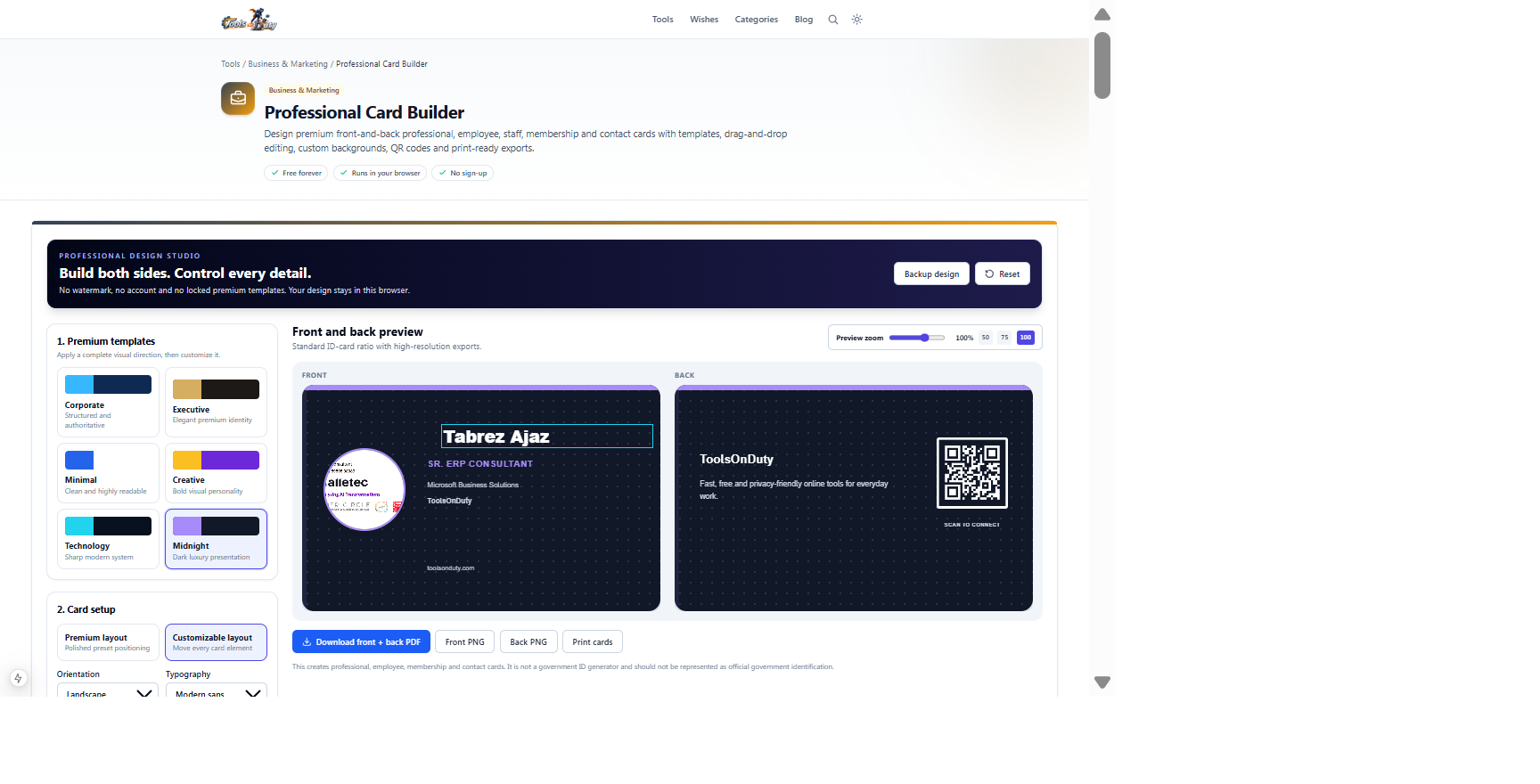
Midnight template, employee identity details, contact information and QR destinationCoordinated front and back card previews with PNG and print-ready PDF exportsThe default draft demonstrates both sides. Change a template or field and watch both previews update before export.
Frequently asked questions
- What types of cards can I create?
- You can create employee, staff, educator, freelancer, organization, event, membership and professional contact cards. The tool is not intended for government-issued identity documents.
- Is this an official government ID maker?
- No. Do not use or represent the output as a passport, driving licence, national identity card, government credential or any other official document.
- Can I design both the front and back?
- Yes. Both sides have live previews, their own content, and independent background-image controls. The PDF export places the front and back on separate pages.
- What is the difference between Premium and Customizable Layout?
- Premium Layout keeps the professionally arranged template positions. Customizable Layout lets you drag and independently style each available front and back element.
- Which elements can I move?
- Depending on the entered content, you can move the photo, logo, name, role, department, organization, employee ID, each contact field, back heading, back message, return details, QR code and QR label.
- Can I lock an element after positioning it?
- Yes. Select the element and enable Lock to prevent accidental dragging. You can unlock it whenever further editing is required.
- Can I use my own front and back designs?
- Yes. Upload separate front and back background images. The selected premium template's text and movable elements remain available above those backgrounds.
- What background-image size should I use?
- Use 1585 by 1000 pixels for landscape or 1000 by 1585 pixels for portrait. A source with at least 1200 pixels on its longest side is recommended for sharper export.
- Can I resize or stretch an uploaded background?
- Yes. Each side has independent fit, zoom, horizontal stretch, vertical stretch, horizontal position, vertical position and color-overlay controls.
- Why should I add a color overlay?
- An overlay reduces background contrast behind text and can improve readability. Adjust it separately for the front and back while checking the live preview.
- Are my photos and card details uploaded?
- No. Image processing, QR creation, editing, autosave and exports run locally in your browser. You decide if and where the exported files are shared.
- Does preview zoom change export quality?
- No. Preview zoom only changes the on-screen working size. PNG and PDF capture temporarily use the normal card scale.
- What does the PDF contain?
- The PDF contains a front page and a back page using standard card proportions. Confirm your printer's scaling and duplex settings before a production print run.
- How do I avoid cropped backgrounds?
- Use Show full image to preserve the whole picture, or Cover card and adjust zoom and X/Y position. Stretch controls can alter proportions when a deliberate squeeze or expansion is needed.
- Can I save and continue later?
- The active design autosaves locally in the browser. Download the JSON backup for a portable editable copy or before clearing browser data.
- Is there a watermark or paid export?
- No. PNG files, the front-and-back PDF and editable backup are free and unwatermarked.
- What should I verify before printing?
- Check spelling, permissions, photo quality, minimum text size, contrast, QR scanning, front/back orientation, printer scaling, bleed expectations and final trimmed dimensions.
Continue your workflow
Open a related tool to prepare your files or refine the finished result.
- Business & MarketingProfessional Headshot Studio
Frame and standardize a supplied portrait for professional profiles with exact formats, background treatments and manual tonal controls.
Open tool - Image ToolsQR Code Generator
Create scan-ready QR codes with payload starters, custom colours, quiet zones and PNG or SVG export.
Open tool - Featured toolBusiness & MarketingProfessional Email Signature Generator
Design a branded business email signature with professional templates, flexible images, social links, a CTA and optional compliance text.
Open tool - Featured toolImage ToolsBackground Remover
Remove the background from a photo with in-browser AI and download a transparent PNG.
Open tool